
Know what sold and what’s in stock
Keep products, prices, and stock in one catalog. Record sales, issue receipts, and handle returns.
 kugi
Record sales, manage stock, organize bookings and rentals, and follow payments in one workspace. Made for the everyday work of running your business.
Complete the study surveys to earn free Kwentro access. Eligibility and study terms apply.
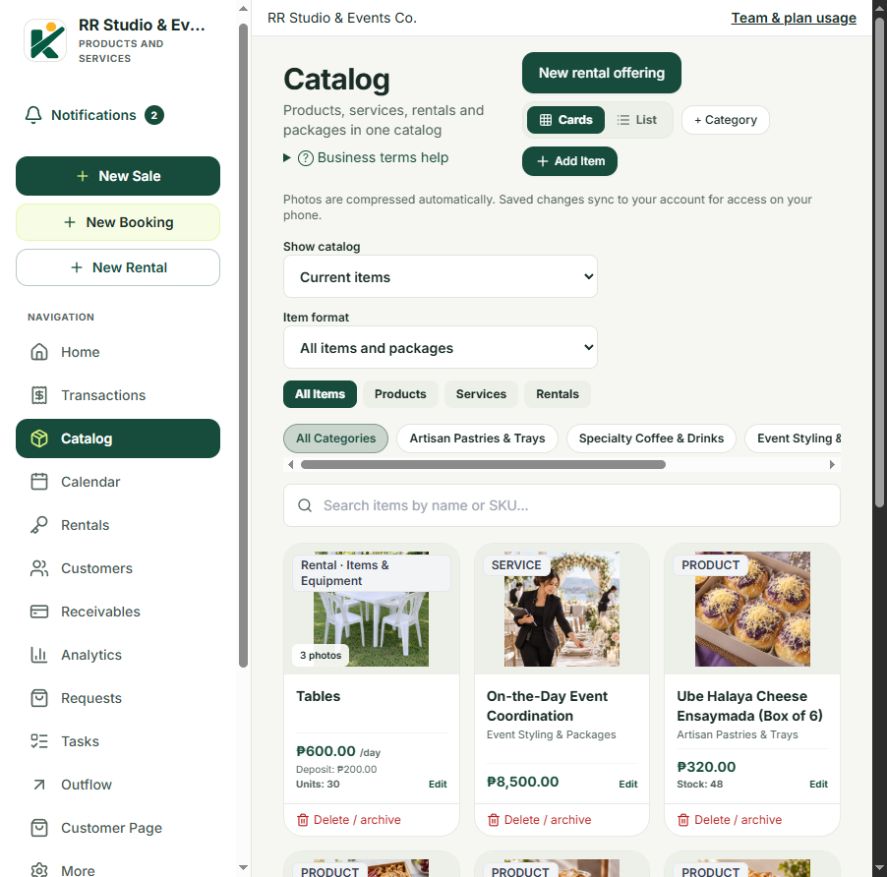
Sell products, offer appointments and home visits, or rent out tables, chairs, sound systems, cars, and spaces. See how Kwentro brings the details together.

Keep your menu or products, sales, payments, and receipts together. Spend less time piecing records together at the end of the day.
Find it in KwentroCatalog · New Sale · Transactions · Analytics
Read the product guideMore to explore Online customer pages, AI business reports, team access, and Android acknowledgment receipts.
Features and usage limits follow your plan. Review AI suggestions against your records. Bluetooth printing needs a compatible Bluetooth Classic ESC/POS printer.
3 free months of Growth + 1 free month of Starter
Eligible merchants complete the pre-test before first use to earn their first free Growth month. Follow-up surveys 1 and 2 each earn another Growth month; the final survey earns one Starter month. Share your honest experience of using Kwentro in your daily business.
Eligibility, enrollment availability, and study terms apply. Surveys are available in English, Tagalog, and Bisaya (Cebuano).
Preparation stage · Formal study approval pending.
Keep products, prices, and stock in one catalog. Record sales, issue receipts, and handle returns.
Organize appointments and events, check availability, and track rental releases and returns.
Record deposits and partial payments. Follow outstanding balances and review your daily collections.
Share your customer page on Facebook, in a message, or through its QR code. Customers can browse your published offerings, place orders, or request service, event, and rental bookings online.
You check availability and any required payment before confirming. Sending a request does not reserve a booking.
Your business, ready to browse.
Choose monthly or annual access.
No automatic charges.
₱249/month
1 owner + 1 staff account
₱399/month
1 owner + 3 staff accounts
₱749/month
1 owner + 10 staff accounts
Choose Starter or Growth for three free months from activation. Activate it online after verifying your email. For first-time Kwentro access; one trial per account. No payment required and no automatic charge.
Register and verify your email. Already have an account? Sign in with your existing Kugi details.
Create an accountChoose a free Starter or Growth trial, or compare paid plans. Paid access starts after payment verification. If you already have a code, activate it in Kugi.
View plans & free trialOpen Kwentro from My Products once access is active. Set up your business and catalog, then start recording sales or bookings.
Go to My ProductsKugi manages your account and product access. Kwentro is your workspace for daily business. Create a Kugi account, verify your email, then sign in. If you selected Starter or Growth during signup, your free trial activates automatically. You can also choose a paid plan or use a previously issued code.
New users can activate three free months of Starter or Growth if they have not activated Kwentro before. Choose one plan, with one trial per account, no payment required and no automatic charge.Choose your free plan and verify your email to start online. No email request or activation code is needed. Already have a code? Activate it here.
In Customer page setup, choose where your service bookings are held: at your business, at the customer's address, a customer choice between those two, or online. Add your business address and any directions, coverage areas, or travel arrangements customers need.
This supports appointments such as massage therapy, hair and beauty, cleaning, repairs, tutoring, photography, and consultations. Set your service prices, durations, opening hours, and eligible staff. Customers can request available times; you review their request and any required payment before confirming. For online services, you arrange the meeting link or joining details.
Set up your catalog, choose the offerings to publish, and add your customer contact and ordering settings. Save and sync your changes before sharing the link or QR code. Published listings and online transactions have allowances based on your chosen plan; compare the plans here.
Kwentro supports offline work after it has been loaded and prepared on your device. Internet is needed for account services, cloud sync, and your online customer page. Keep encrypted backups and avoid clearing the browser’s site data.
Sign in to Kugi and visit My Products to check your access and open Kwentro. It opens in a new tab; you may need to sign in again if your session has expired.
The merchant study is in preparation, with formal approval pending. Check the study information and dashboard for current enrollment, eligibility, and agreement terms. Eligible participants complete the pre-test before first use, training, or onboarding.
Eligible merchants can earn three free months of Growth and one free month of Starter by completing the pre-test and three follow-up surveys. Each completed eligible survey starts activation of its earned access automatically. Your study dashboard shows the result and access dates. If activation is pending, use Retry activation there; your submitted answers are saved.
Need a hand getting started?
Talk to Kugi support